Help & Support Center
Find answers, troubleshoot issues, and get the most out of your hospitality training
Getting Started
4 articlesAccount & Login
5 articlesTraining & Courses
5 articlesCertificates & Verification
5 articlesPricing & Billing
5 articlesBusiness & Enterprise
5 articlesTechnical Support
5 articlesAccount & Login
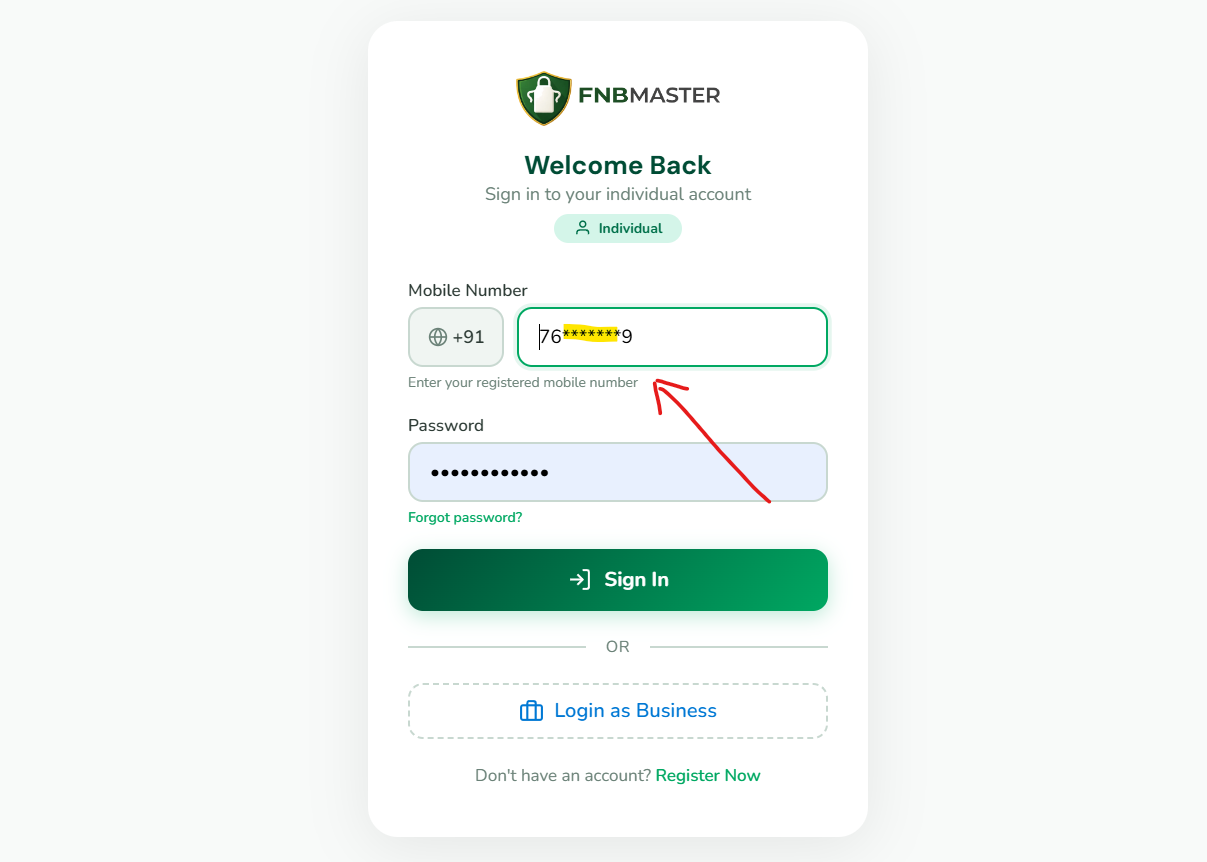
Login with mobile number
How to log in using your registered mobile number and password.
To log in to FNBMaster, visit fnbmaster.com/login. Select your country code from the dropdown (16 countries supported including India +91, UAE +971, USA +1, UK +44, and more). Enter your registered mobile number without the country code. Type your password and click Login. The system supports multiple mobile number formats for flexibility. If you registered with +91 9876543210, you can also log in with 9876543210 or 919876543210. Upon successful authentication, you will be redirected to your dashboard. Your session remains active for 24 hours for convenience.
Country code selection
Selecting the correct country code for international mobile numbers.
FNBMaster supports learners from 16 countries. On the login and registration pages, you will find a country code dropdown next to the mobile number field. Available countries include India (+91), UAE (+971), USA/Canada (+1), UK (+44), Saudi Arabia (+966), Qatar (+974), Oman (+968), Bahrain (+973), Kuwait (+965), Singapore (+65), Malaysia (+60), Australia (+61), Philippines (+63), Sri Lanka (+94), Bangladesh (+880), and Nepal (+977). Each country has its own mobile number format and validation pattern. Selecting the correct country ensures proper mobile number formatting and validation. The format hint below the input field updates dynamically when you change the country.
Password recovery
Steps to recover or reset your forgotten password.
If you forget your password, contact our support team at support@fnbmaster.com from your registered email address. Provide your full name, registered mobile number, and FNBM ID if available. Our team will verify your identity and assist with password recovery. For security reasons, password resets require identity verification. Once verified, you will receive instructions to set a new password. Always use strong passwords with at least 8 characters including uppercase letters, numbers, and special characters. Avoid using easily guessable information like birthdays or common words.
Account security tips
Best practices for keeping your FNBMaster account secure.
Protect your FNBMaster account with these security best practices: Use a strong, unique password that you do not use on other websites. Never share your password or FNBM ID with anyone. Always log out when using shared or public devices. Keep your registered mobile number and email address updated. Enable two-factor authentication if available. Be cautious of phishing attempts — FNBMaster will never ask for your password via email or phone. Report any suspicious activity to support@fnbmaster.com immediately. Regularly review your account activity and learning progress for any unauthorized access.
Session management
Understanding login sessions and automatic logout behavior.
FNBMaster uses secure session management to protect your account. Your login session remains active for up to 24 hours. After 24 hours of inactivity, you will be automatically logged out for security. If you are logged out, simply log back in with your credentials. Sessions are tied to your browser and device. If you clear your browser cookies or use a different browser, you will need to log in again. On shared devices, always use the logout button to end your session. The platform uses secure HTTP-only cookies with SameSite protection to prevent unauthorized access.
Frequently Asked Questions
How do I reset my password?
Contact support@fnbmaster.com from your registered email address. Provide your full name, registered mobile number, and FNBM ID if available. Our team will verify your identity and assist with password recovery. For security reasons, password resets require identity verification.
Can I switch languages while learning?
Yes! FNBMaster supports 7 Indian languages: English, हिन्दी, தமிழ், తెలుగు, ಕನ್ನಡ, മലയാളം, and বাংলা. You can switch languages at any time — even between different sections within the same module. Language switching is available from the video player and the language selector.
How long do I have access to courses?
All FNBMaster plans include lifetime access. Pay once, learn forever with no subscriptions, no renewals, and no expiry dates. This includes all future content updates and new language additions at no extra cost.
How do I verify a certificate?
Visit fnbmaster.com/verify and enter either the Certificate ID or the learner's FNBM ID. The verification page displays certificate details including the learner's name, module completed, completion date, and validity status. You can also scan the QR code on any certificate for instant verification.
What payment methods are accepted?
We accept UPI (Google Pay, PhonePe, Paytm), credit/debit cards (Visa, Mastercard, RuPay), net banking from all major Indian banks, and popular digital wallets. All payments are processed securely through our payment gateway.
Is there a free trial available?
Yes! The Starter plan is completely free forever with no credit card required. It includes 9 introductory videos and access in 1 language. This allows you to explore the platform and experience the training quality before upgrading to a paid plan.
How do I contact customer support?
You can reach our support team by email at support@fnbmaster.com or by phone at +91 6385 861144. Support is available during business hours (Monday-Saturday, 9 AM to 7 PM IST). Enterprise customers have access to priority support and dedicated account managers.
Can I access FNBMaster on multiple devices?
Yes! FNBMaster works on all devices — smartphones, tablets, laptops, and desktops. Your progress syncs across devices, so you can start learning on one device and continue on another. There is no limit to the number of devices you can use.
Still Need Help?
+91 6385 861144
Our support team is available Monday-Saturday, 9 AM to 7 PM IST